
wList 3.0

Fast File Search: Find & List Files
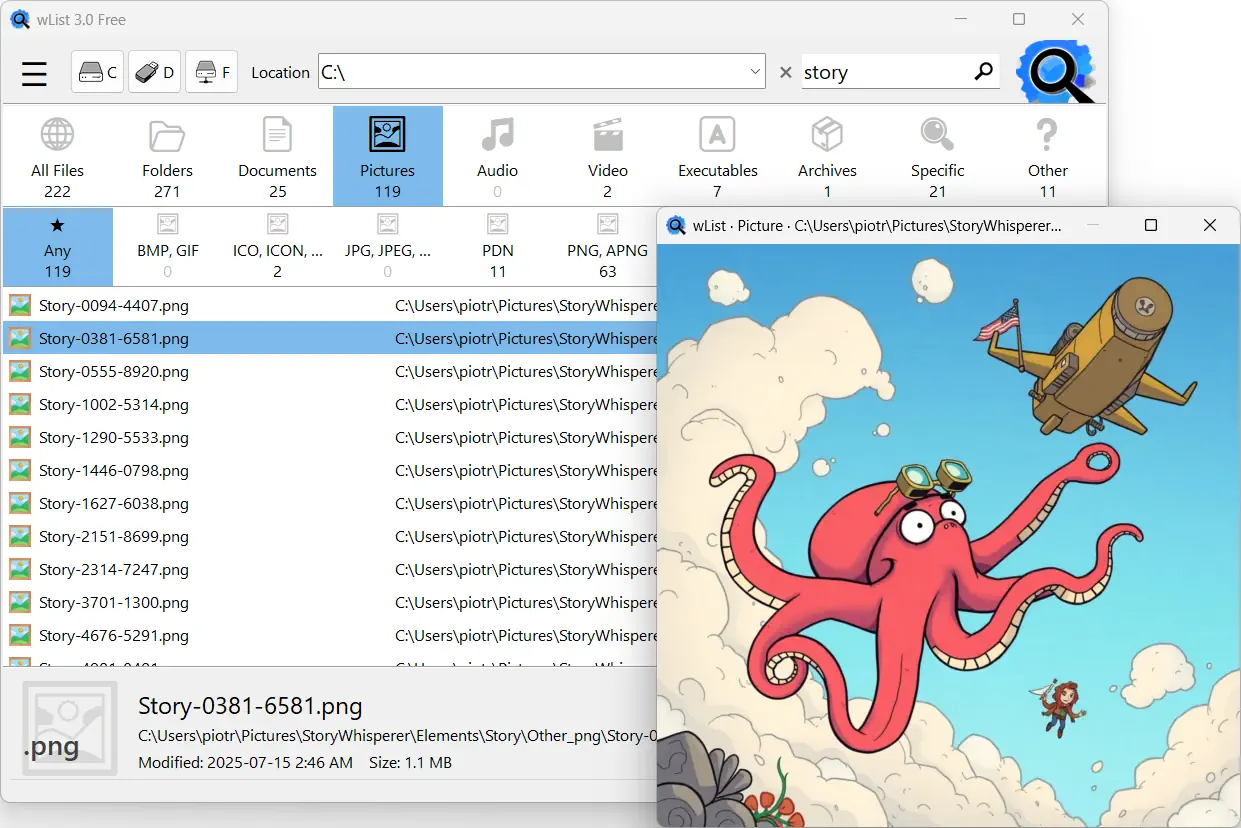
Find files in seconds, not minutes. wList is a fast and lightweight file search tool for Windows that quickly finds files on both local drives and network shares, while allowing you to create professional file lists.
Built for both everyday users and IT pros, wList combines intelligent caching and smart categorization so repeat searches are blazingly quick and results stay accurate. Beyond search, it doubles as a professional directory lister – create clean, customizable file lists and printable folder reports in moments, with low resource requirements – no need to run in the background.
Download wList and stop hunting for files.


Key Features
Features designed with your convenience in mind:
- 🚀 Fast File Search and Discovery – Locate files and folders across entire drives quickly.
- 📁 Smart File Categories & Filtering – Use wList as a specialized document finder or media locator with ease.
- 📋 Professional Directory Printer – Easily list directory contents and create a file catalog for external drives.
- 🌐 Network File Search – Perform LAN search tasks easily on shared network drives.
- ✅ Clean, action-oriented UI – Access any find file result or its containing folder directly from the app.
- 📷 Integrated Image Viewer – Visually verify images found during file searches without using external software.
- 🌎 Unicode and Diacritics Support – Handle national characters during file search and file listing operations.
- 🔋 Low Resource Usage – Does not burden the system because it does not need to run in the background.
Why Choose wList?
- Unmatched speed and precision for local and network file search.
- Smart categorization to find exactly what you need without the clutter.
- Create and export professional file lists and directory inventories instantly.
- A lightweight interface purpose-built for maximum efficiency and ease of use.
- Pure, bloat-free performance that respects your system resources and privacy.
File Searching and Directory Listing Reimagined
Start Finding with a Smile
We know that in today’s world of massive hard drives and complex networks, finding the right file can feel like a hassle. Default search tools often struggle to keep up with a modern pace, but that is where wList comes in to help! Designed to be your friendly, professional file finder, this app bridges the gap between simple discovery and comprehensive data management. We have evolved wList from a handy directory lister into a high-performance tool that helps you locate files with effortless accuracy. It is the perfect companion for anyone who wants to navigate their digital life smoothly and start finding with a smile.
Blazing Speed and Performance Without the Bloat
We believe software should be powerful, focused, and incredibly lightweight. The magic behind wList is our smart, next-generation disk indexer. Unlike traditional tools that might slow down your PC in the background, wList uses intelligent on-demand indexing to give you a truly respectful quick search experience. It is a pure file search engine designed without unnecessary background processes, ensuring your system stays fast and your privacy remains respected.
This is a total lifesaver for professionals performing deep LAN searches or navigating massive network file search results where traditional browsing feels sluggish. Whether you are searching a high-capacity local drive, a flash drive, or an external disk, wList delivers unmatched speed and precision. We effectively eliminate the "waiting game," allowing you to search files and locate missing data across thousands of folders in the blink of an eye. If you need a fast search tool that respects your time and your computer's resources, you are going to love wList.
Professional File Lists and the Modern "dir" Experience
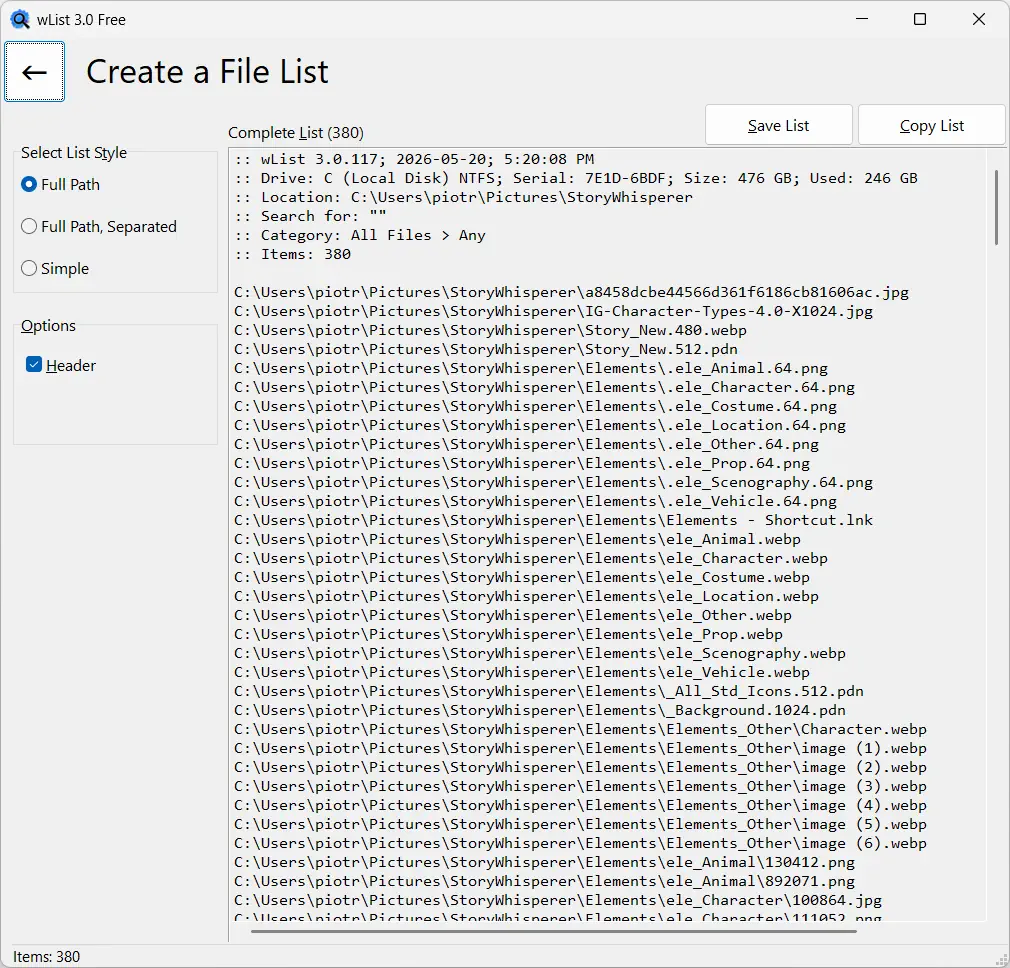
Finding a file is wonderful, but sometimes you need to document your findings. wList goes further by serving as your personal directory printer and file list creator. Whether you are generating a professional file inventory for an audit or just need a fast way to export directory contents for a project, wList handles the task with ease. For those who cherish the simplicity of the classic "dir" command but love the comfort of a modern interface, our clean "dir in window" design lets you list folder contents and manage your directory list in a pleasant, distraction-free environment.
wList makes it incredibly easy to generate a simple file list or a comprehensive directory listing from even the most complicated folders. You can format your results using three clear styles, then save them to a text file or copy your filelist to the clipboard for immediate use. Plus, support for Unicode ensures you can search files and create file lists containing national characters in any language without a hitch. It is a powerful, user-friendly document finder that provides professional results every time.
Smart Categories for a Streamlined Workflow
Efficiency isn't just about speed; it is about finding exactly what matters to you. To help you focus, wList features smart categories, acting as your dedicated document finder, photo locator, and media helper all in one. With 10 major categories and 49 specialized sub-categories, it is the most versatile file lister available today. By grouping your results into helpful categories, we streamline your workflow and eliminate the need to scroll through unrelated system files.
This categories allows you to filter your search results instantly. You can open files or their containing folders from the app with a simple double-click. Whether you want to find specific files, their locations, or simply create a list of files that are important for your current task, wList provides a smarter way to work.
Common file categories include:
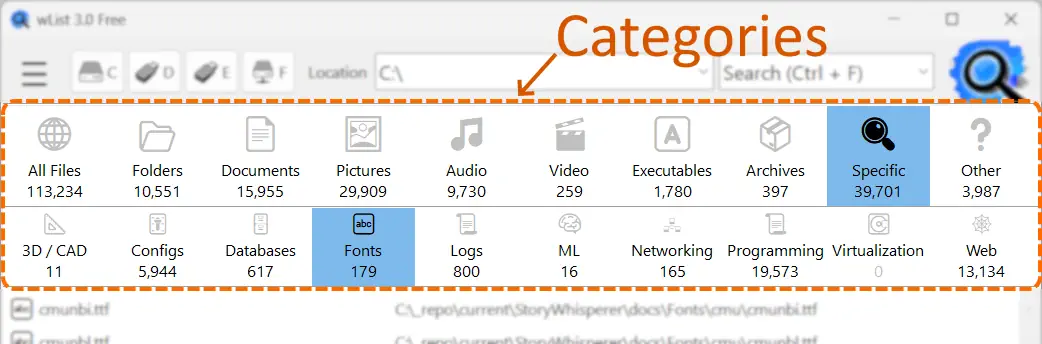
- 📄 Documents – PDF, DOC, DOCX, XLS, XLSX, ODT, ODS, ...
- 🖼 Pictures – JPEG, JPG, PNG, WEBP, SVG, BMP, GIF, ...
- 🎵 Audio – MP3, OGG, WAV, FLAC, MID, MIDI, ...
- 🎬 Video – AVI, DIVX, MOV, MP4, MPEG, MPG, WMV, ...
- 🅰 Executables – EXE, MSIX, APPX, PS1, BAT, ...
- 📦 Archives – ZIP, 7Z, GZ, GZIP, RAR, ...
Relive Your Memories and Organize Your Media
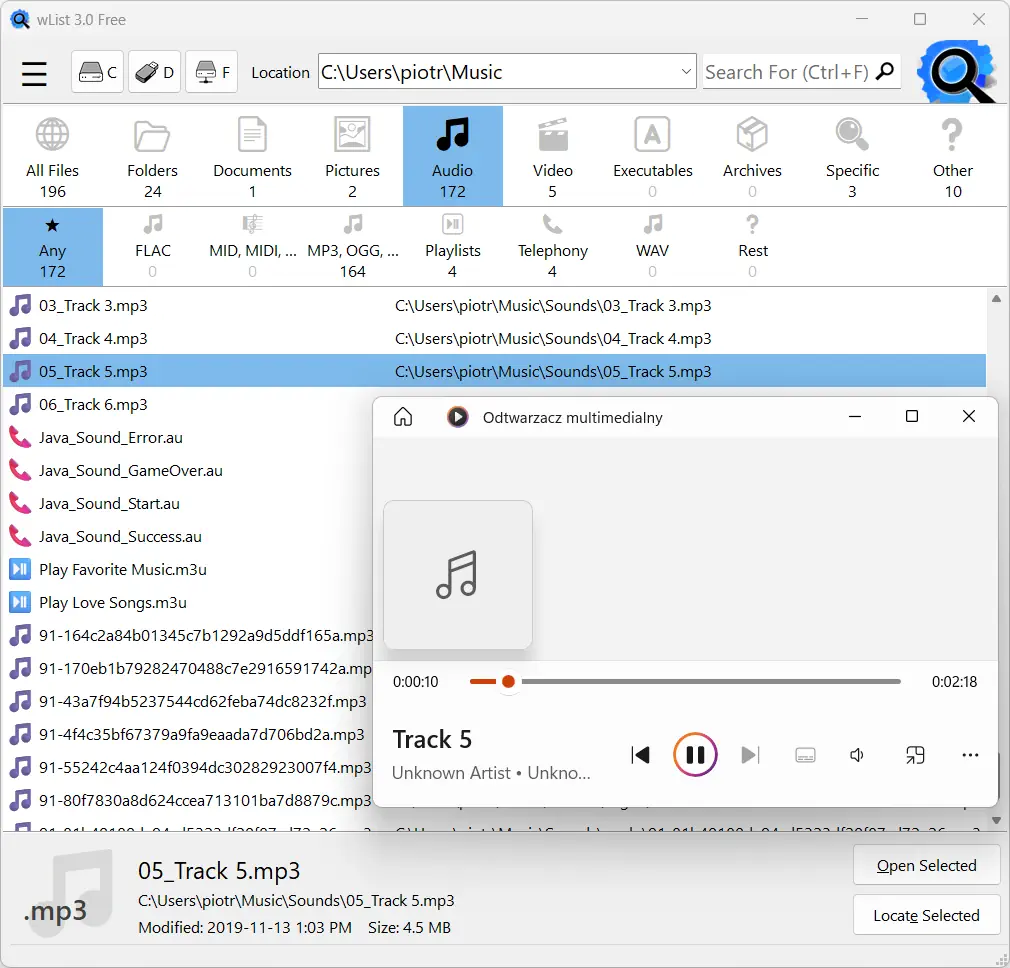
Searching for your music and photos should be fun, not a chore. wList makes it easy to find files across your hard drive, external backups, network share, or even old CDs and DVDs. Use it as a personal file catalog to create a comprehensive list of your entire library-from MP3s and high-fidelity FLAC files to standard JPG and modern WebP images. To listen to a music or view a photo, simply double-click it.
We have all been there-knowing a precious photo exists but having no idea where it is hiding. If you used a meaningful folder name or filename, wList makes finding it incredibly easy. While the first search triggers the initial indexing and may take a moment, every subsequent search is blazing fast. This allows you to experiment with different phrases and spot your missing files instantly.
Example scenarios for searching media files or creating a file list:
- To list all MP3 files, simply type .MP3 (the dot and extension) into the search field and press ENTER.
- To find a specific song, in the search field type a part of the filename and select the category Audio > MP3, OGG, ....
- To find a specific photo, in the search field type a part of the filename and select the category Pictures > JPEG, JPG, ....
This is a very quick way to organize and access your media library located in many different locations.
What wList Doesn't Do
- It doesn't search file contents.
- It doesn't search and organize results by file size (yet).
- It doesn't run in the background, so it doesn't burden the system.
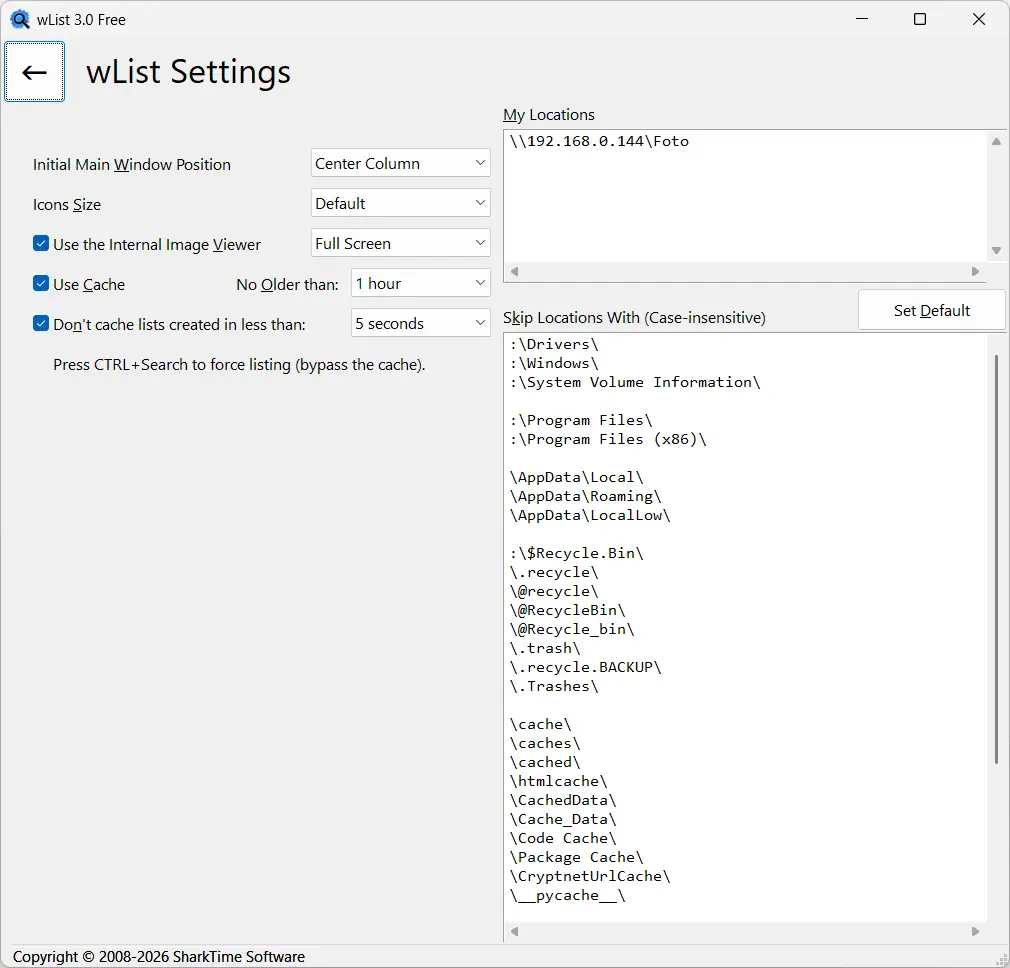
wList does not index drives in real time; it indexes them on demand. Searching a given location begins with indexing. Indexing speed depends on disk parameters, directory structure and number of files. In some cases, indexing can take an exceptionally long time. Once indexed, subsequent searches are lightning fast.
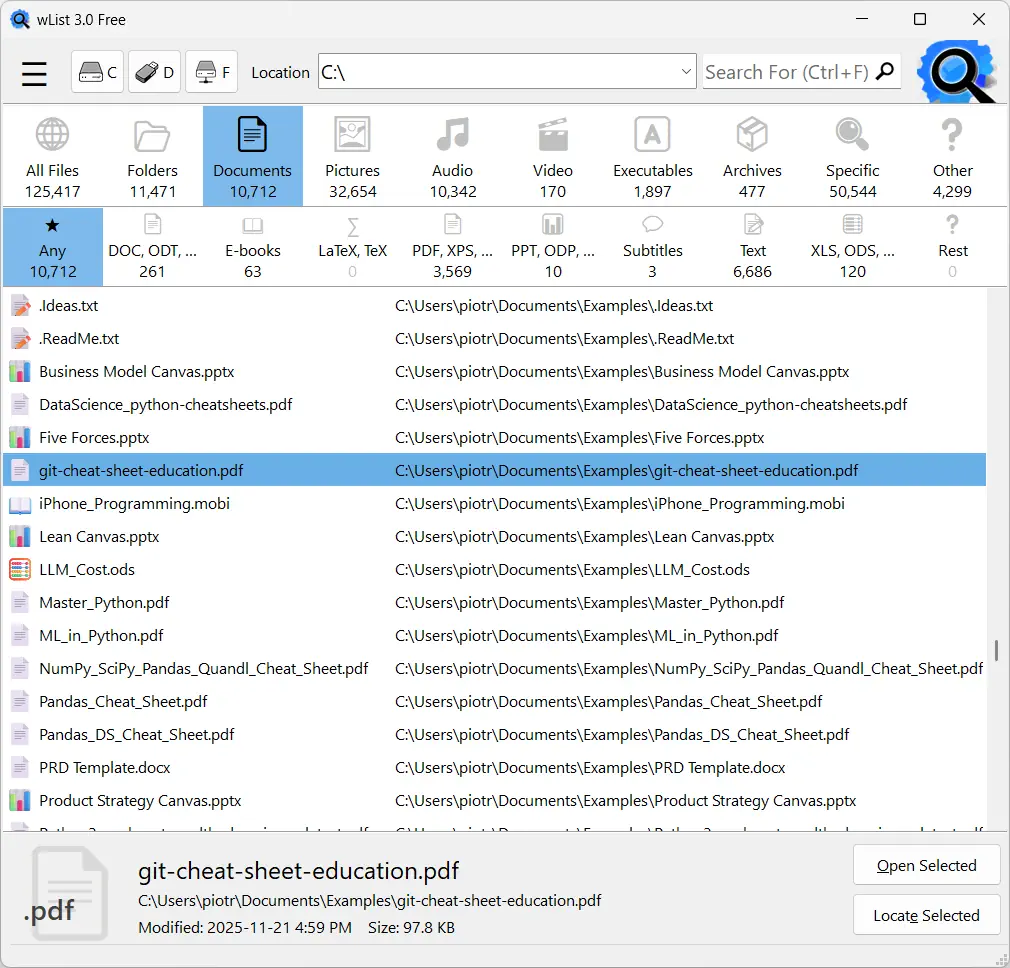
Screenshots
wList FAQ
About the program
What is wList for?
Who is wList intended for?
How does wList differ from system search and other similar programs?
wList stands out in several ways:
- No background system load: Unlike many third-party search tools, wList does not run continuously in the background and does not consume computer resources. It indexes files strictly on demand.
- Precision and clarity: It hits the mark better by allowing you to quickly filter results using convenient categories (e.g., Documents, Pictures, Audio) while filtering out unnecessary clutter like temporary files.
- Reliable results: It searches every location specified by the user (including LAN network shares).
Is wList completely free?
Support
How do I get app support?
How do I report a problem/bug in an app?
I like it, how can I help?
- Use the app and share it with others.
- Rate the app and write a short review.
- Share information about the app on social media, your blog, or discussion forums.
- Ask questions and make suggestions for improvement.
Security
Is my data and are my files safe when I use wList?
Why should I download the app from the Microsoft Store?
Application operation and functionality
Can I print from wList?
How do I create a single list of files from multiple locations/drives?
Download wList
Safe and fast installation directly from the official Microsoft Store:

Instantly find files on local and network drives using super-fast cache technology. Categorize results intelligently (Audio, Documents, Video, etc.) and generate clean, accessible file lists. wList supports national characters (Unicode).
File searching and file listing redefined.
| wList 3.0.117 | |
|---|---|
| Published: | May 19, 2026 |
| Producer: | SharkTime Software |
| Compatibility: | Windows 10 or later |
| License: | Shareware |
| Cost: | Free |